<img height="1" width="1" style="display:none" src="https://www.facebook.com/tr?id=1005154772848053&amp;ev=PageView&amp;noscript=1">

Educator choice, student agency.

Educators choose the AI and validity levels required. Students answer short viva-style questions and demonstrate authorship continuity and cognitive command.

Studiosity-educator-choiceEducator choice.

Your assessment, your controls.

Studiosity-student-agencyStudent agency

Students want to show what they learned.

Studiosity-validated-outcomesClear assessment validity

'Validity' has meaning - yours.


Designed to be easy for educators, from beginning to end.

Take a look through: from the educator view to the student's self-validated final submission and beyond.


How it works


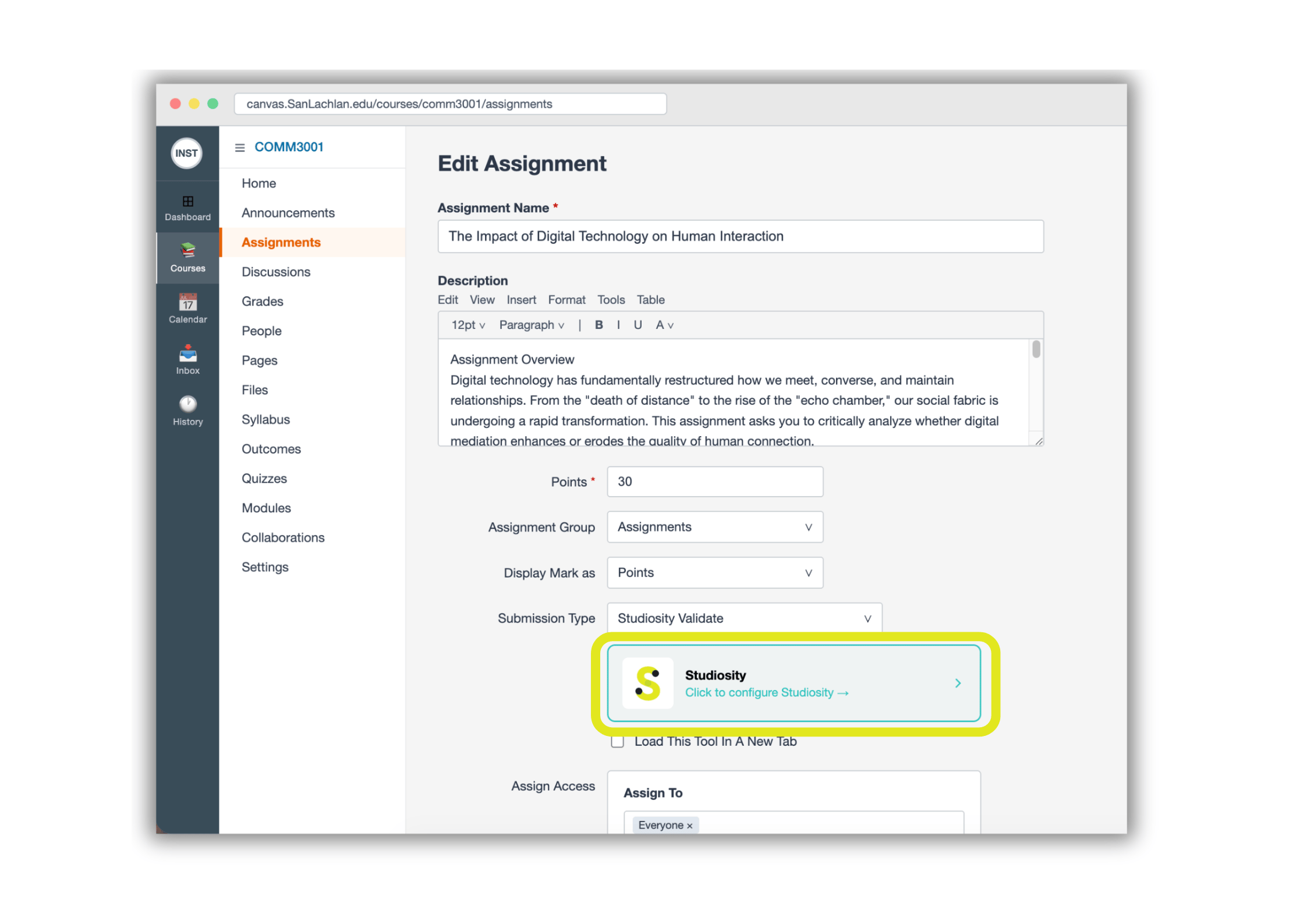
First, set up your assignment as usual in your LMS.

Link your assignment to Studiosity.

When you integrate Studiosity into an assignment, your students get the opportunity to self-validate their work before it is submitted for final grading.

Educators - Edit assignment


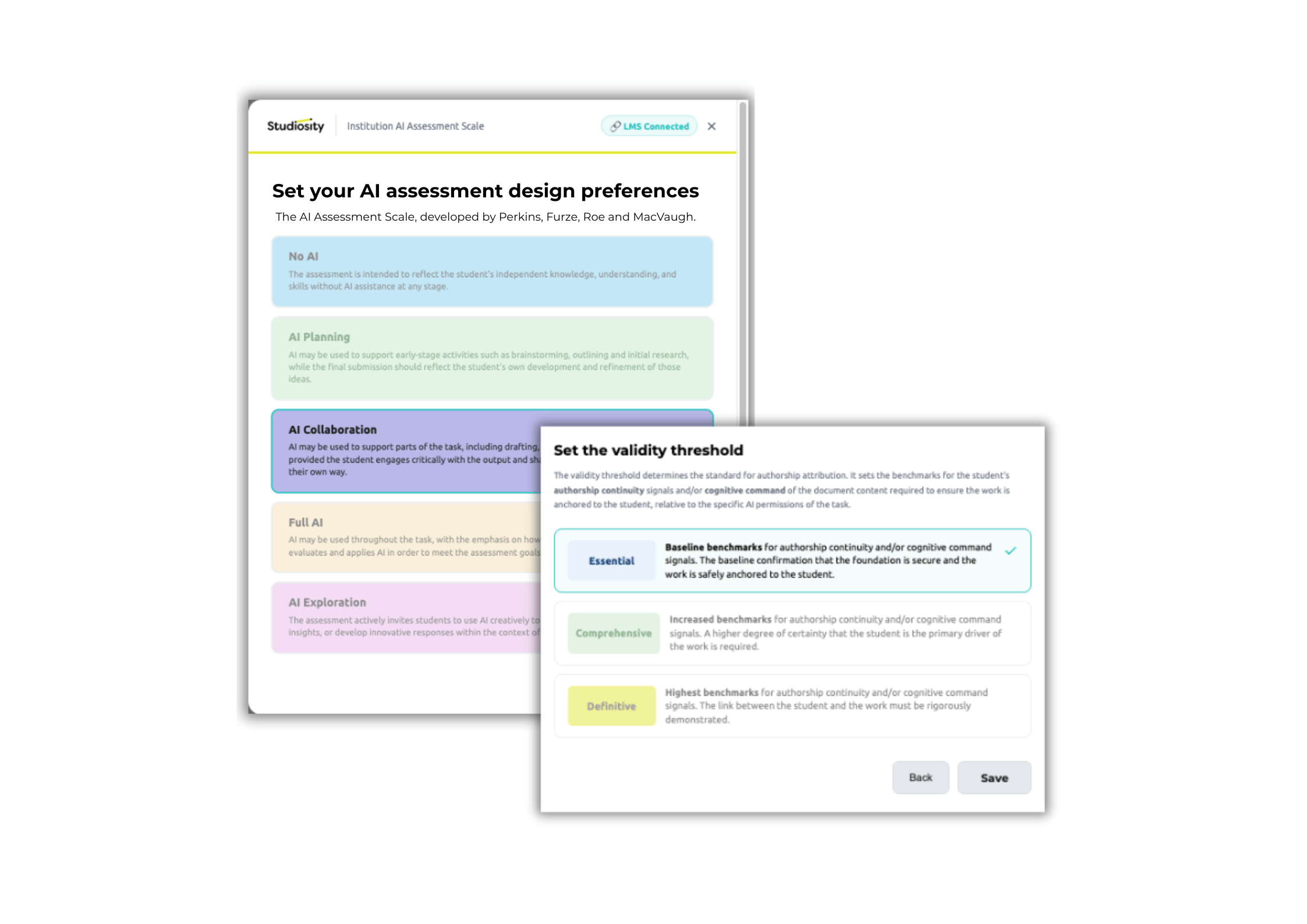
Educators - Assessment design


You always get two controls for your assignment / item:

 

Studiosity-Effort-Icon

1. How much effort do you want your students to demonstrate for this task? From authorship via drafts, to content knowledge and engagement with their work, students build this up to show their critical thinking and journey.

Studiosity-Threshold-Icon 2. How much AI do you want as part of assessment design? Using the UNESCO-reviewed, AI for Assessment Scale (Furze et al., 2024).


Clear, simple indicators of valid student learning. No integrity 'scores' needed, ever again.

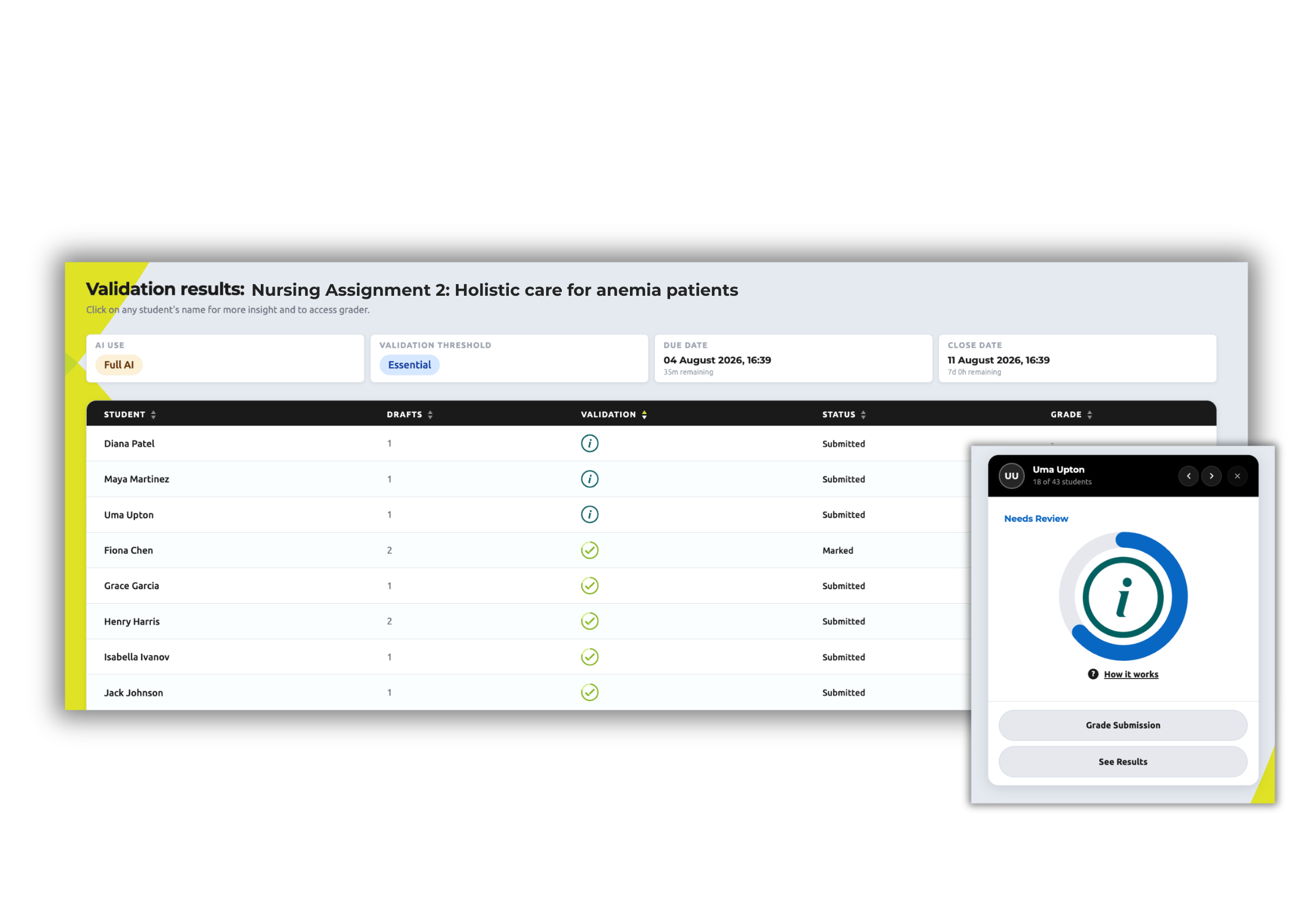
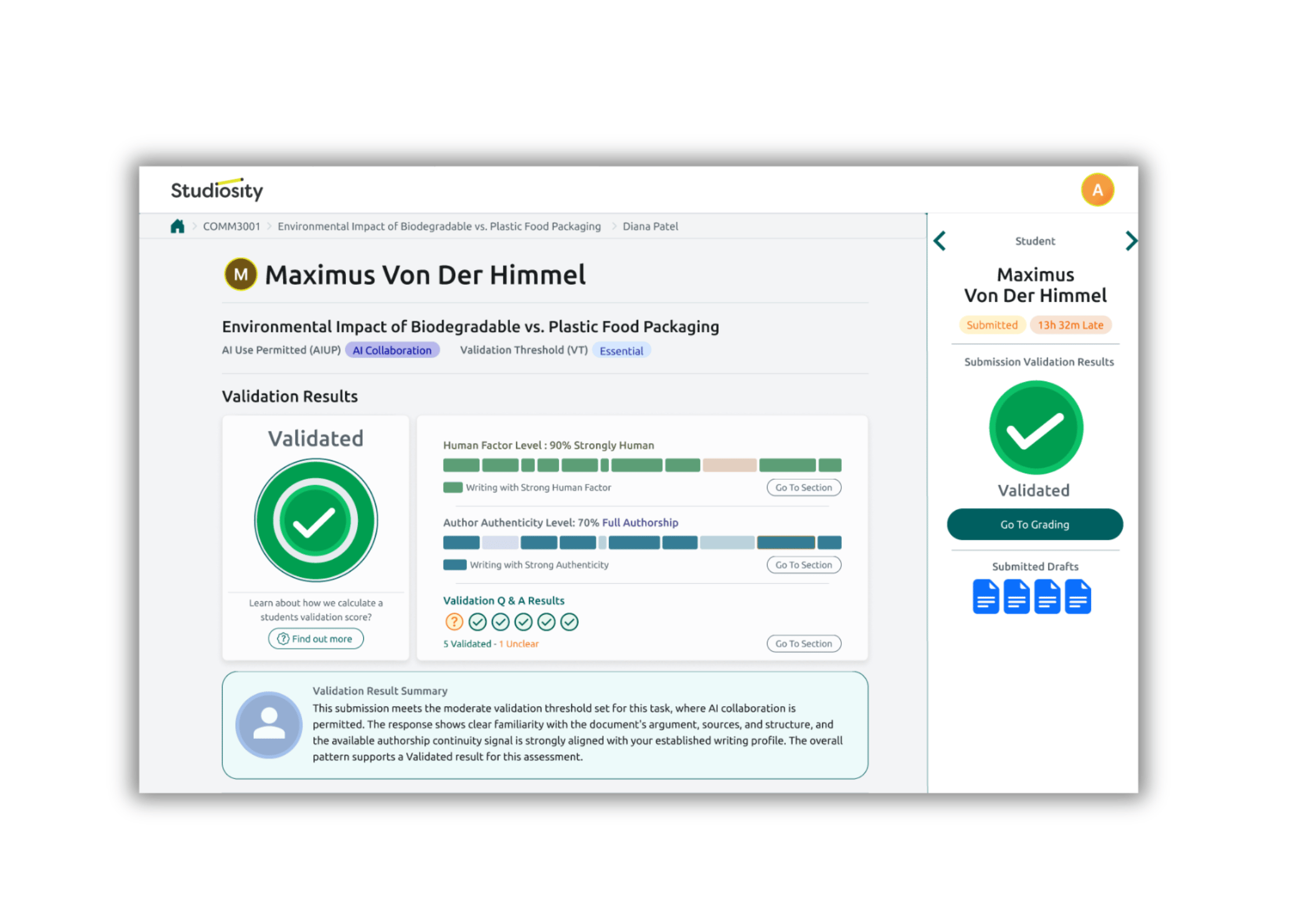
From your Studiosity Educator Dashboard, quickly see the validation status of your course, unit, paper.

This fast overview - based on your own choices for assessment design - puts the focus on the students' learning and thinking journey, not end-point security.

Educators - Validation results - student list


Educators - Student validation report


More detail, when you need it.

Drill down into an individual student’s validation results on an exception basis, before or during grading.

Studiosity-laptop-UI-icon-reverse

What do your students see?

When you are done with set up, students see their assignment details, as usual.

Studiosity-assignment-plain-icon

They upload their sample writing document. This can be added the moment a student enrols.

Studiosity-upload-plain-icon-white

Submit from their LMS, or immediately from inside Studiosity - where they get formative feedback.

Studiosity-blanks-cloze-icon-white

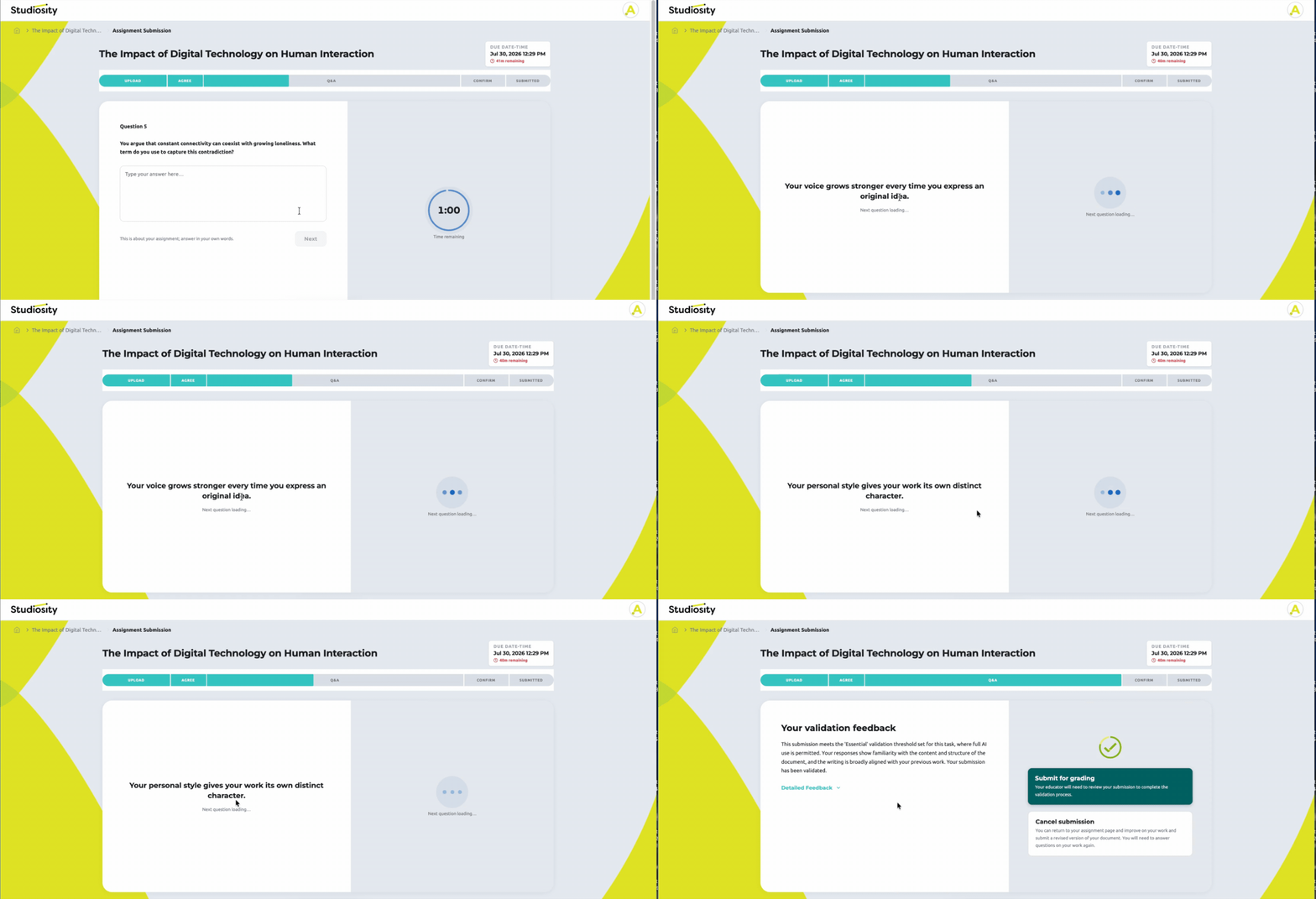
At submission, students also get short, timed questions to show knowledge of their assignment, just part of their overall, demonstrated validity.


Why is this important?

Studiosity-swiss-cheese-multi-layer-icon

Studiosity is a multi-layered approach to developing and showing students' critical skills.

Studiosity-no-surveillance-icon-white

Suspicion-free zone; instead, building trust in teaching and learning.


Learn more

Educator FAQs

More FAQs here
What is Studiosity?
- +

Studiosity is an automated, pedagogically-designed layer over your assessment design, that supports and validates student learning via assessment or formative tasks - putting the focus back on learning, not policing. 

It provides a way to support and validate student learning via assessment or formative tasks, for any lane or policy.

For students, it includes formative feedback through their journey - for any task. At submission, it includes relevant questions to students about their authorship and learning, giving them the opportunity to show understanding of their work, viva voce-style. This is a significant departure from simply 'evading detection' as a final stage of their assessment journey. 

For educators, it is a streamlined process. The same assignment flow, just two inputs aligned to the time of semester or stakes of the assessment. 

A valid 'tick' for each student submission indicates validity. Historically, this is where the detective used to start. But now - there are no 'percentage scores' about AI or similarity here. Because surveillance isn’t the point, learning is the point.

How does this fit into my institution's academic integrity process?
- +
Studiosity sits alongside your institution’s existing academic integrity framework, and does not replace it.

It shifts part of the focus upstream, from relying primarily on post-submission detection, to providing structured visibility into student learning processes at the point of submission. Through authorship continuity, engagement prompts, and viva-style validation questions, it helps document how a student developed and understands their work.

Within your integrity process, this means it can act as an additional source of context. It helps distinguish between students who can clearly articulate their learning and development, and those where there may be limited evidence of process or understanding within the validation step.

Where concerns arise, educators still use their institution’s established academic integrity procedures, professional judgement, and escalation pathways. This tool does not determine misconduct; it contributes structured learning evidence to inform decision-making within existing policies.
How do the AI and Validity Threshold configurations work?
- +

As an educator, you can choose your level of acceptable AI use, using the standarised AI for Assessment Scale (Furze et al., 2024)

You also select your ‘validity threshold’. This is the level of validation you would like students to demonstrate for a particular assessment task. It reflects how much engagement and understanding of the content students are expected to show alongside their final submission.

Students are able to self-validate their learning through timed viva-style questions, at the point of submission. 

The threshold can be aligned to the type of assessment, learning outcomes, student cohort, and the level of assurance needed for the task.

How do I use the validity report?
- +

The validity report is designed to give you a clear view of where each student is in the validation process at the point of submission.

Passed validation indicates that the student has completed the validation requirements for your selected threshold. This includes demonstrating sufficient engagement with their work through authorship continuity and successfully responding to the validation questions that explore their understanding and process.

Validation pending means the student has not yet completed the full validation process. This could be because they have not fully answered the validation questions, have not yet demonstrated sufficient engagement for the selected threshold, or require further opportunity to complete the process.

In practice, this helps you quickly see which students have already provided a complete picture of their learning, and which may still need to complete their validation before you proceed with final grading or review.

The report is intended as a workflow indicator, helping you understand where each student is in demonstrating their learning process, so you can manage assessment review more efficiently.


Learn more about Studiosity's approach to integrity infrastructure.